🏨 STAZY - Hệ thống đặt phòng khách sạn Microservices
Nền tảng đặt phòng khách sạn hiện đại với kiến trúc microservices, AI recommendation và real-time notifications
English version: README_EN.md
📋 Mục lục
- Tổng quan
- Demo
- Công nghệ sử dụng
- Kiến trúc hệ thống
- Yêu cầu hệ thống
- Cài đặt và Setup
- Chạy dự án
- Cấu trúc thư mục
- API Routes
- Services và Ports
🎯 Tổng quan
STAZY là một hệ thống đặt phòng khách sạn được xây dựng theo kiến trúc microservices với các tính năng:
- ✨ Tìm kiếm và đặt phòng thông minh
- 🤖 AI recommendation sử dụng machine learning
- 💳 Tích hợp thanh toán Stripe
- 🔔 Thông báo real-time với Socket.io
- 📊 Dashboard quản trị với analytics
- 📧 Email automation
- 🔄 Event-driven architecture với Kafka
🎬 Demo
Video demo: https://www.youtube.com/watch?v=sTJITGJX0XQ
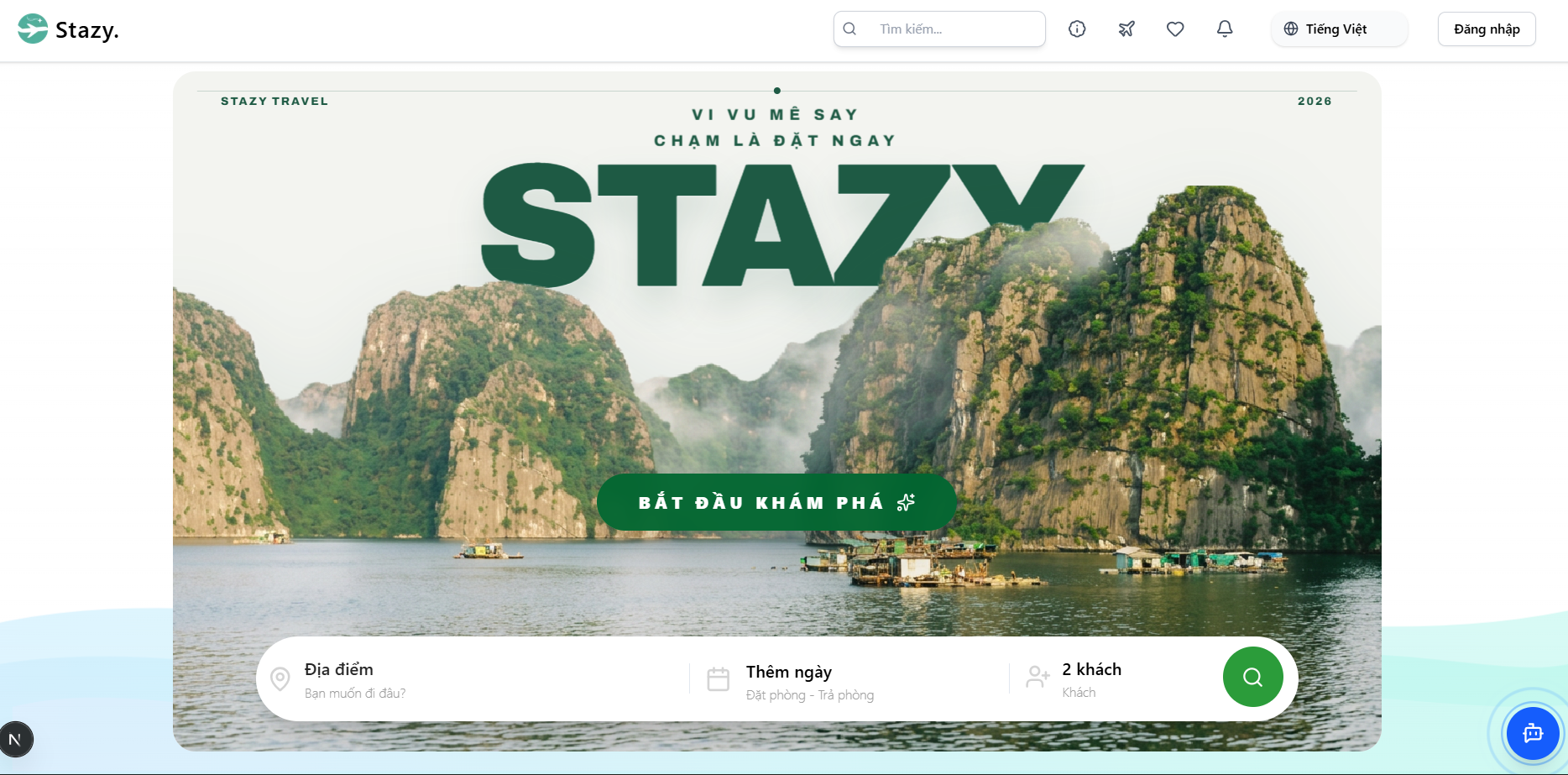
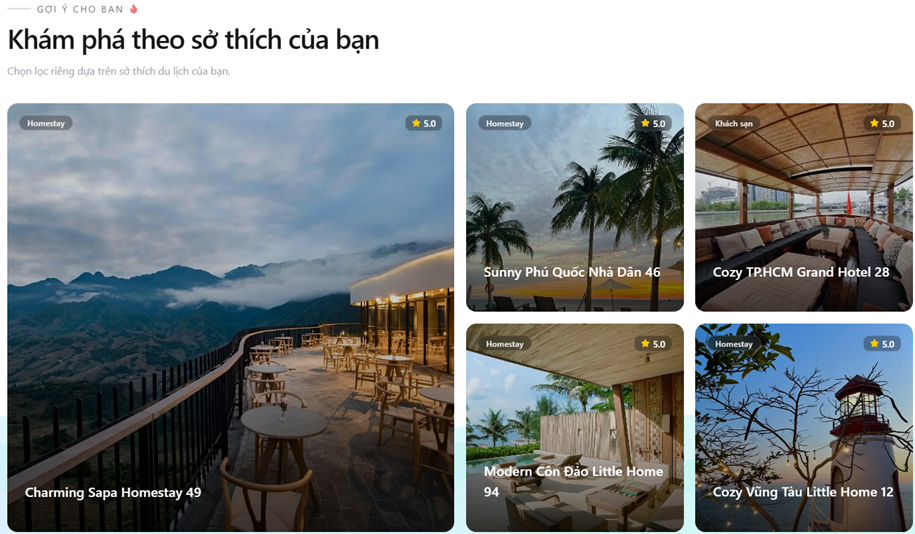
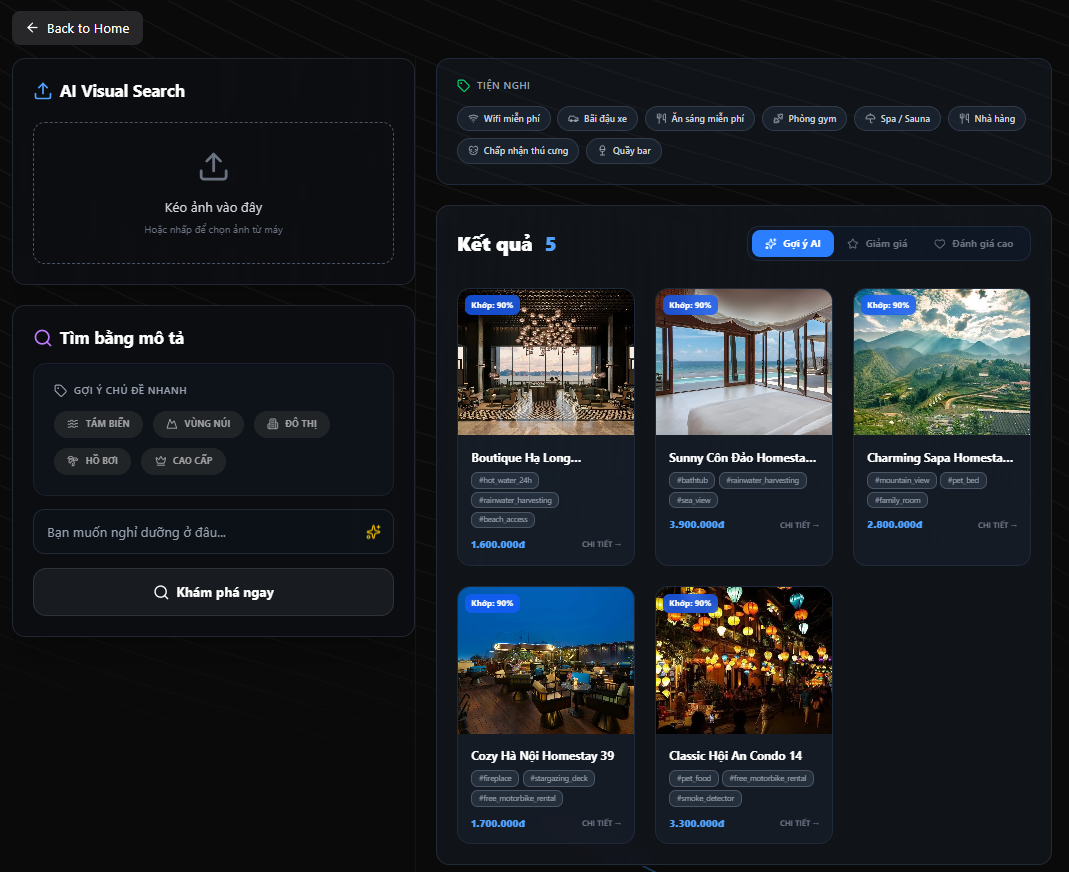
Thứ tự ảnh demo bên dưới được sắp theo luồng trải nghiệm thực tế:
- Homepage
- Recommendation
- AI Search
- Chat 1
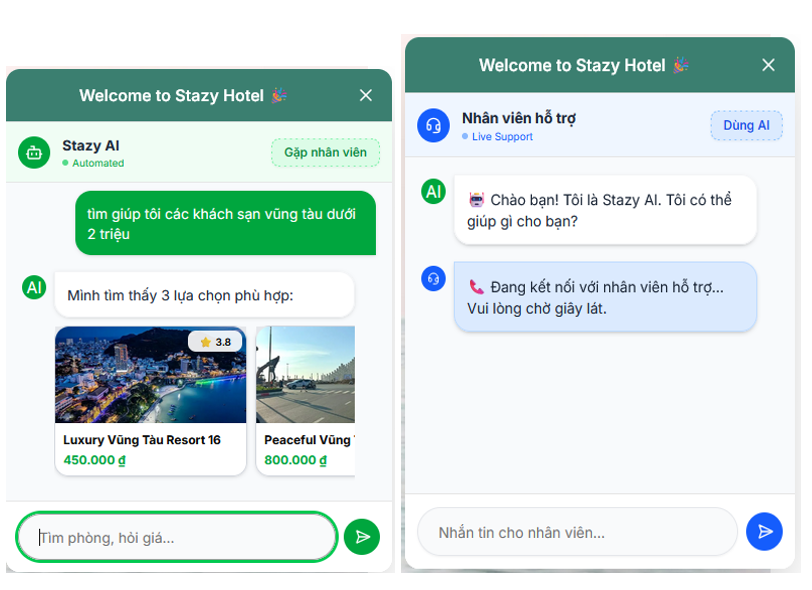
- Chat 2
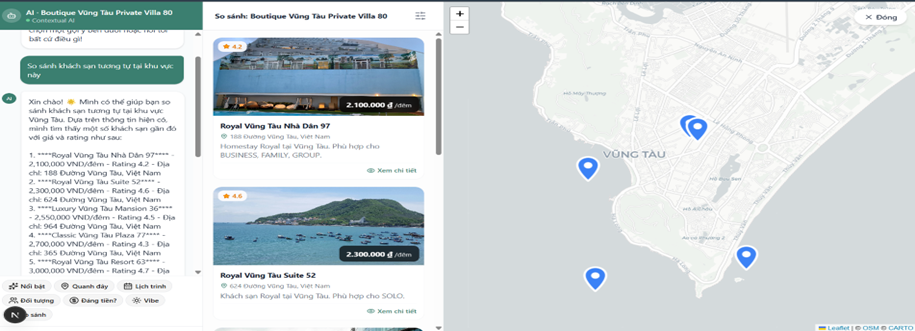
- Detail
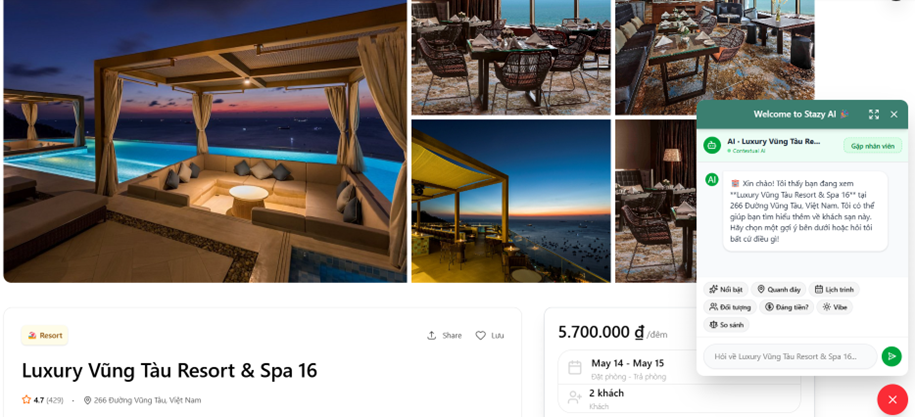
- Payment
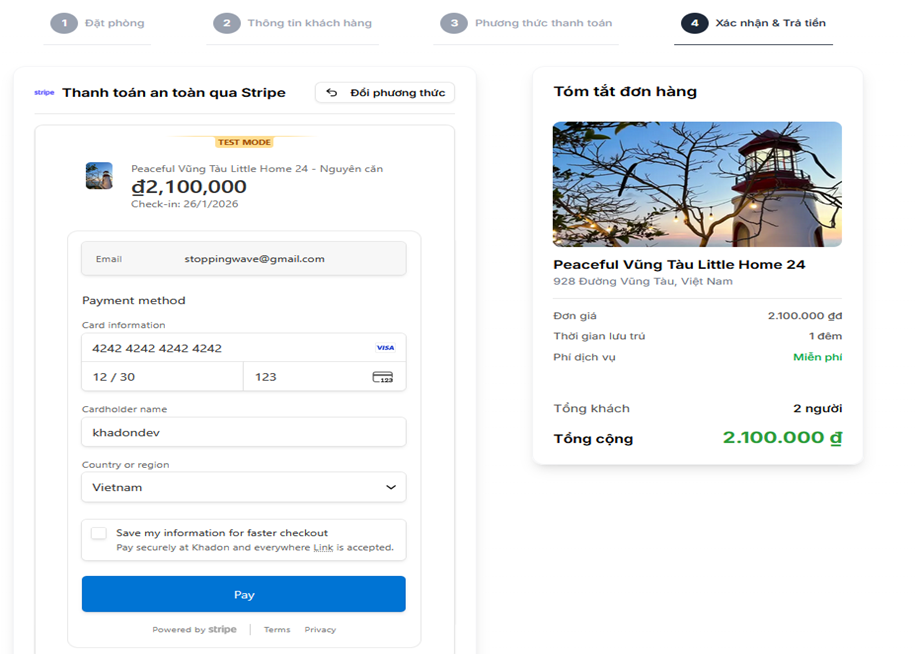
- Dashboard
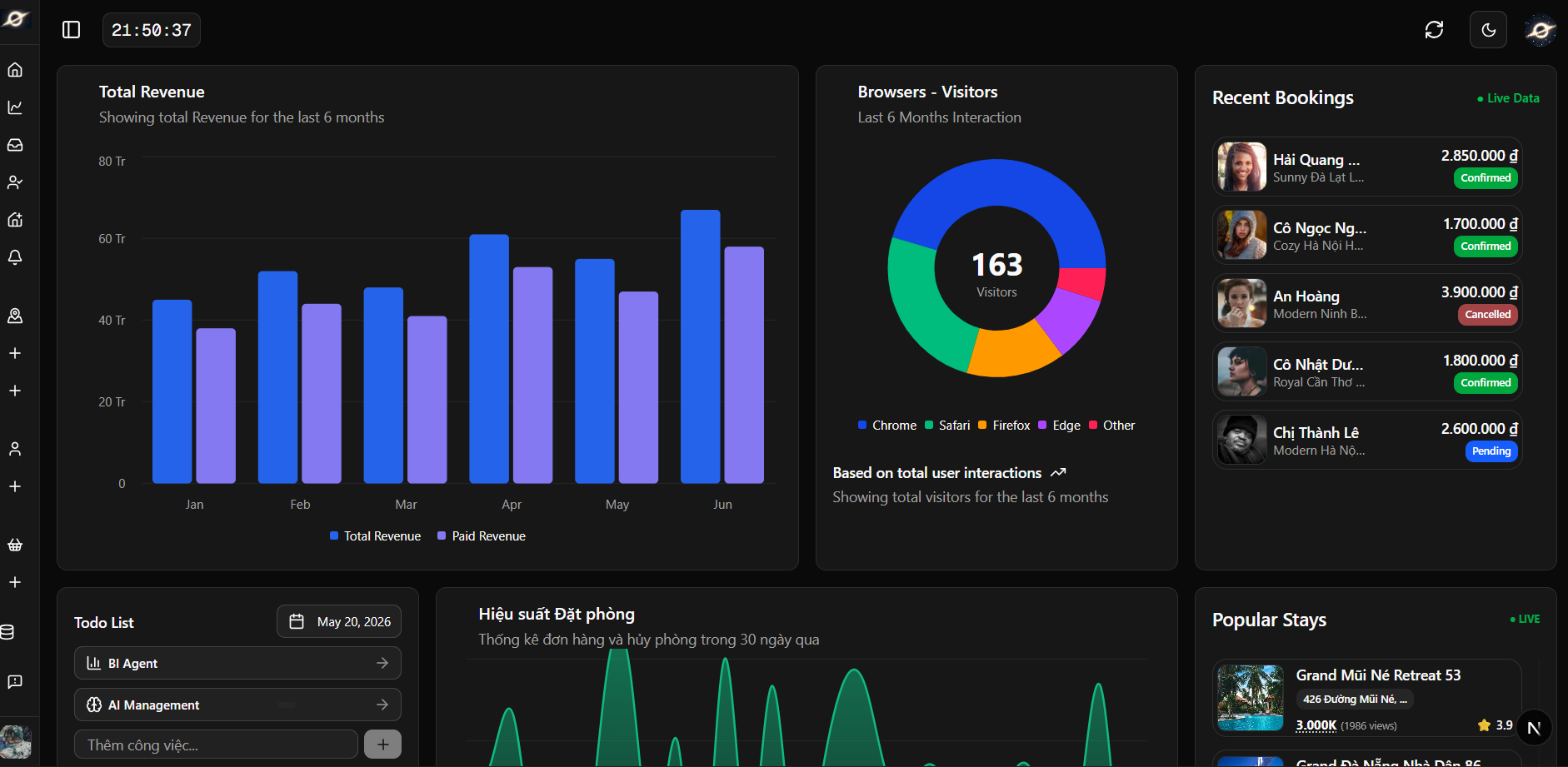
🛠 Công nghệ sử dụng
Frontend Applications
-
Client (Next.js 16 + React 19)
- Port:
3002 - Framework: Next.js với Turbopack
- UI: Radix UI, Tailwind CSS 4
- State: TanStack Query, Zustand
- Authentication: Clerk
- Port:
-
Admin (Next.js 16 + React 19)
- Port:
3003 - Framework: Next.js với Turbopack
- UI: Radix UI, Tailwind CSS 4
- Charts: D3.js
- Authentication: Clerk
- Port:
Backend Services
1. Product Service (Express.js)
- Port:
8000 - Framework: Express 5
- Features: Quản lý sản phẩm, khách sạn, phòng
- Auth: Clerk Express
2. Booking Service (Fastify)
- Port:
8001 - Framework: Fastify 5
- Features: Đặt phòng, quản lý booking, cron jobs
- Database: PostgreSQL (Prisma)
- Cache: Redis + Redlock
3. Payment Service (Hono)
- Port:
8002 - Framework: Hono
- Features: Thanh toán Stripe, webhooks
- ⚠️ Quan trọng: Cần expose qua ngrok để nhận webhook từ Stripe
- Auth: Hono Clerk
4. Search Service (FastAPI - Python)
- Port:
8008 - Framework: FastAPI
- Features: AI recommendation, semantic search
- ML: Scikit-learn, Transformers, Sentence-Transformers
- Vector DB: PostgreSQL với pgvector
5. Socket Service (Fastify + Socket.io)
- Port:
3005 - Framework: Fastify 5 + Socket.io
- Features: Real-time chat, notifications
- Database: PostgreSQL (Prisma - ChatMessage)
- Integration: Kafka consumer (
booking.confirmed), BullMQ
6. Email Service (Node.js)
- Framework: Node.js standalone
- Features: Send emails với Nodemailer
- Integration: Kafka consumer
Shared Packages
@repo/product-db: Prisma schema & client cho PostgreSQL@repo/booking-db: Prisma schema & client cho MongoDB@repo/kafka: Kafka client configuration@repo/types: Shared TypeScript types@repo/typescript-config: Shared tsconfig@repo/eslint-config: Shared ESLint config
Infrastructure
- Kafka: Event streaming (3 brokers + Kafka UI)
- Ports:
9094,9095,9096,8080
- Ports:
- PostgreSQL: Main database với pgvector
- Port:
5432
- Port:
- Redis: Caching & distributed locks
- Port:
6379
- Port:
- MongoDB: Legacy (booking-db package, unused in routes)
- Docker: Container orchestration
🏗 Kiến trúc hệ thống
┌──────────────┐           ┌──────────────┐
│   Client     │           │    Admin     │
│  (Next.js)   │           │  (Next.js)   │
│    :3002     │           │    :3003     │
└──────┬───────┘           └──────┬───────┘
       │                          │
       ├──────────────────────────┤
       │                          │
┌──────▼──────────────────────────▼──────┐
│        API Gateway (Fastify)           │
│               :3000                    │
└──┬────────┬────────┬────────┬──────────┘
   │        │        │        │
┌──▼───┐ ┌──▼────┐ ┌─▼───┐ ┌──▼───┐
│Prod. │ │Booking│ │Pay. │ │Search│
│:8000 │ │:8001  │ │:8002│ │:8008 │
│Express│ │Fastify│ │Hono │ │Py/   │
│      │ │       │ │     │ │FastAPI│
└──┬───┘ └──┬────┘ └─┬───┘ └──────┘
   │        │        │
   │   ┌────┘        │
   │   │             │
┌──▼───▼─────────────▼──────────┐
│       Kafka Cluster           │
│        :9094-9096             │
│  Topics: hotel.created/deleted│
│          booking-events       │
│          payment-events       │
│          booking.confirmed    │
│          user.created         │
└──┬────────┬────────┬──────────┘
   │        │        │
┌──▼───┐ ┌──▼───┐ ┌──▼────┐
│Email │ │Socket│ │BullMQ │
│:8003 │ │:3005 │ │Workers│
│SMTP  │ │Socket│ │(Redis)│
│      │ │  .io │ │       │
└──────┘ └──┬───┘ └───────┘
             │
┌────────────▼──────────────────────────┐
│         Data & Cache Layer            │
│                                       │
│ ┌────────────┐ ┌─────────┐ ┌───────┐ │
│ │ PostgreSQL │ │ MongoDB │ │ Redis │ │
│ │   :5432    │ │ (Legacy)│ │ :6379 │ │
│ │            │ │         │ │       │ │
│ │ Shared DB  │ │ Unused  │ │Redlock│ │
│ │ (Prisma)   │ │ in      │ │Room   │ │
│ │ + pgvector │ │ routes  │ │Hold   │ │
│ │            │ │         │ │BullMQ │ │
│ └────────────┘ └─────────┘ └───────┘ │
└───────────────────────────────────────┘
Luồng sự kiện chính:
| Event Flow | Mô tả |
| --------------------------------------------------------------------------- | ----------------------------- |
| POST /hotels → Kafka hotel.created → Payment → Stripe Product | Admin tạo KS → đồng bộ Stripe |
| POST /bookings → Redis Lock + Outbox → Kafka booking-events | User đặt phòng → Saga Pattern |
| booking-events → Payment → Stripe Webhook → Kafka PAYMENT_PROCESSED | Thanh toán thành công |
| PAYMENT_PROCESSED → Booking (BullMQ) → Kafka booking.confirmed → Socket | Xác nhận → Thông báo realtime |
| PAYMENT_PROCESSED → Email (BullMQ) → Gửi email xác nhận | Gửi mail đặt phòng thành công |
| POST /check-availability → Redis getHold() | Kiểm tra phòng + hold status |
💻 Yêu cầu hệ thống
Phần mềm cần cài đặt:
- Node.js >= 18
- pnpm 9.0.0 (Package manager)
- Docker Desktop (Bắt buộc cho Kafka, PostgreSQL, Redis)
- Python 3.10+ (Cho search-service)
- ngrok (Cho payment webhook)
- Git
Tài khoản cần thiết:
- Clerk Account (Authentication)
- Stripe Account (Payment)
- Cloudinary Account (Image hosting)
🚀 Cài đặt và Setup
1. Clone Repository
git clone <repository-url>
cd stazy
2. Cài đặt Dependencies
# Cài đặt pnpm nếu chưa có
npm install -g pnpm@9.0.0

# Cài đặt tất cả dependencies cho TOÀN BỘ workspace
# (bao gồm tất cả apps và packages)
pnpm install
Lưu ý: Chỉ cần chạy pnpm install một lần ở thư mục gốc, pnpm workspace sẽ tự động cài dependencies cho tất cả services. KHÔNG cần vào từng thư mục apps/packages để cài riêng lẻ.
3. Setup Docker Services
Yêu cầu: Docker Desktop phải được cài đặt và đang chạy
# Di chuyển vào thư mục kafka
cd packages/kafka

# Khởi động tất cả services (Kafka, PostgreSQL, Redis)
docker compose up -d

# Kiểm tra services đang chạy
docker ps
Services được khởi động:
- 3 Kafka Brokers (ports: 9094, 9095, 9096)
- Kafka UI (port: 8080) - http://localhost:8080
- PostgreSQL với pgvector (port: 5432)
- Redis (port: 6379)
- Redis Insight (port: 8001)
4. Setup Database
# Quay lại root folder
cd ../..

# Generate Prisma Client cho product-db
cd packages/product-db
pnpm prisma generate
pnpm prisma db push

# Generate Prisma Client cho booking-db
create account Mongodb
5. Setup Python Environment (Search Service)
cd apps/search-service

# Tạo virtual environment
python -m venv venv

# Kích hoạt virtual environment
# Windows:
venv\Scripts\activate
# Linux/Mac:
source venv/bin/activate

# Cài đặt dependencies
pip install -r requirements.txt

cd ../..
6. Setup ngrok cho Payment Webhook
⚠️ Quan trọng: Payment service cần expose ra internet để nhận webhook từ Stripe
# Cài đặt ngrok (nếu chưa có)
# Windows: choco install ngrok
# Mac: brew install ngrok

# Expose port 8002
ngrok http 8002
Lưu ý: Copy URL từ ngrok (ví dụ: https://abc123.ngrok.io) và cập nhật vào Stripe Dashboard > Webhooks
7. Cấu hình Environment Variables
Tạo file .env cho từng service:
apps/client/.env
NEXT_PUBLIC_CLERK_PUBLISHABLE_KEY=pk_test_xxx
CLERK_SECRET_KEY=sk_test_xxx
NEXT_PUBLIC_CLERK_SIGN_IN_URL=/sign-in
NEXT_PUBLIC_CLERK_SIGN_UP_URL=/sign-up
DATABASE_URL=postgresql://admin:123456@localhost:5432/products
NEXT_PUBLIC_PRODUCT_SERVICE_URL=http://localhost:8000
NEXT_PUBLIC_BOOKING_SERVICE_URL=http://localhost:8001
NEXT_PUBLIC_PAYMENT_SERVICE_URL=http://localhost:8002
NEXT_PUBLIC_SEARCH_SERVICE_URL=http://localhost:8008
NEXT_PUBLIC_SOCKET_SERVICE_URL=http://localhost:3005
NEXT_PUBLIC_STRIPE_PUBLISHABLE_KEY=pk_test_xxx
apps/admin/.env
NEXT_PUBLIC_CLERK_PUBLISHABLE_KEY=pk_test_xxx
CLERK_SECRET_KEY=sk_test_xxx
DATABASE_URL=postgresql://admin:123456@localhost:5432/products
NEXT_PUBLIC_PRODUCT_SERVICE_URL=http://localhost:8000
NEXT_PUBLIC_BOOKING_SERVICE_URL=http://localhost:8001
apps/product-service/.env
PORT=8000
DATABASE_URL=postgresql://admin:123456@localhost:5432/products
CLERK_PUBLISHABLE_KEY=pk_test_xxx
CLERK_SECRET_KEY=sk_test_xxx
KAFKA_BROKERS=localhost:9094,localhost:9095,localhost:9096
apps/booking-service/.env
PORT=8001
MONGODB_URI=mongodb://localhost:27017/bookings
DATABASE_URL=postgresql://admin:123456@localhost:5432/products
REDIS_HOST=localhost
REDIS_PORT=6379
CLERK_PUBLISHABLE_KEY=pk_test_xxx
KAFKA_BROKERS=localhost:9094,localhost:9095,localhost:9096
apps/payment-service/.env
PORT=8002
STRIPE_SECRET_KEY=sk_test_xxx
STRIPE_WEBHOOK_SECRET=whsec_xxx
KAFKA_BROKERS=localhost:9094,localhost:9095,localhost:9096
DATABASE_URL=postgresql://admin:123456@localhost:5432/products
CLERK_PUBLISHABLE_KEY=pk_test_xxx
apps/socket-service/.env
PORT=3005
DATABASE_URL=postgresql://admin:123456@localhost:5432/products
KAFKA_BROKERS=localhost:9094,localhost:9095,localhost:9096
apps/search-service/.env
PORT=8008
DATABASE_URL=postgresql://admin:123456@localhost:5432/products
CLOUDINARY_CLOUD_NAME=xxx
CLOUDINARY_API_KEY=xxx
CLOUDINARY_API_SECRET=xxx
▶️ Chạy dự án
Chạy tất cả services (Development)
# Từ root directory
turbo dev
Chạy từng service riêng lẻ
# Client
pnpm --filter client dev

# Admin
pnpm --filter admin dev

# Product Service
pnpm --filter product-service dev

# Booking Service
pnpm --filter booking-service dev

# Payment Service
pnpm --filter payment-service dev

# Socket Service
pnpm --filter socket-service dev

# Search Service (Python)
cd apps/search-service
# Kích hoạt venv trước
venv\Scripts\activate  # Windows
source venv/bin/activate  # Linux/Mac
python main.py
Build Production
# Build tất cả
pnpm build

# Build service cụ thể
pnpm --filter client build
pnpm --filter admin build
📁 Cấu trúc thư mục
stazy/
├── apps/                          # Applications
│   ├── client/                    # Next.js Client (Port 3002)
│   │   ├── src/
│   │   │   ├── app/              # App Router pages
│   │   │   ├── components/       # React components
│   │   │   ├── hooks/            # Custom hooks
│   │   │   └── lib/              # Utilities
│   │   └── package.json
│   │
│   ├── admin/                     # Next.js Admin (Port 3003)
│   │   ├── src/
│   │   │   ├── app/              # App Router pages
│   │   │   ├── components/       # React components
│   │   │   └── lib/              # Utilities
│   │   └── package.json
│   │
│   ├── product-service/           # Express API (Port 8000)
│   │   ├── src/
│   │   │   ├── routes/           # API routes
│   │   │   ├── middleware/       # Express middleware
│   │   │   └── index.ts
│   │   └── package.json
│   │
│   ├── booking-service/           # Fastify API (Port 8001)
│   │   ├── src/
│   │   │   ├── routes/           # API routes
│   │   │   ├── cron/             # Cron jobs
│   │   │   └── index.ts
│   │   └── package.json
│   │
│   ├── payment-service/           # Hono API (Port 8002)
│   │   ├── src/
│   │   │   ├── routes/           # Payment routes
│   │   │   └── index.ts
│   │   └── package.json
│   │
│   ├── search-service/            # FastAPI Python (Port 8008)
│   │   ├── main.py               # FastAPI app
│   │   ├── requirements.txt
│   │   └── *.py                  # ML & AI modules
│   │
│   ├── socket-service/            # Fastify + Socket.io (Port 3005)
│   │   ├── src/
│   │   │   └── index.ts
│   │   └── package.json
│   │
│   └── email-service/             # Email Worker
│   │    ├── src/
│   │    └── package.json
│   │
│   └── gateway/             #  api controll
│       ├── src/
│       └── package.json
│
├── packages/                      # Shared packages
│   ├── product-db/               # Prisma PostgreSQL
│   ├── booking-db/               # Prisma MongoDB
│   ├── kafka/                    # Kafka config + Docker
│   ├── types/                    # Shared types
│   ├── typescript-config/        # Shared tsconfig
│   └── eslint-config/            # Shared ESLint
│
├── package.json                   # Root package.json
├── pnpm-workspace.yaml           # PNPM workspace config
└── turbo.json                    # Turborepo config
🌐 API Routes
Client Routes (Port 3002)
Public Routes
/- Trang chủ/hotels- Danh sách khách sạn/hotels/[id]- Chi tiết khách sạn/search- Tìm kiếm khách sạn/about- Về chúng tôi
Authenticated Routes
/profile- Thông tin người dùng/my-bookings- Lịch sử đặt phòng/cart- Giỏ hàng/checkout- Thanh toán/host- Đăng ký làm host/host/dashboard- Dashboard cho host
Auth Routes
/sign-in- Đăng nhập/sign-up- Đăng ký
Admin Routes (Port 3003)
Dashboard
/- Tổng quan dashboard/analytics- Phân tích thống kê
Management
/products- Quản lý sản phẩm/khách sạn/products/create- Tạo sản phẩm mới/products/[id]- Chi tiết/Sửa sản phẩm/bookings- Quản lý đặt phòng/bookings/[id]- Chi tiết booking/users- Quản lý người dùng/notifications- Thông báo/message- Tin nhắn/Chat support
Backend API Routes
Product Service (Port 8000)
Base URL: http://localhost:8000
Health & Test
GET /health- Health checkGET /test- Test authentication (🔐 Requires Auth)
Hotels
GET /hotels- Lấy danh sách khách sạn (filter, search, pagination)GET /hotels/:id- Xem chi tiết khách sạn + thông tin tác giảGET /hotels/:id/related- Lấy khách sạn liên quanGET /hotels/my-hotels- Lấy khách sạn của tác giả (🔐 Requires Auth)GET /hotels/admin-view/:id- Xem chi tiết cho admin (🔐 Requires Admin)POST /hotels- Tạo khách sạn mới (🔐 Requires Auth)PUT /hotels/:id- Cập nhật khách sạn (🔐 Requires Admin)DELETE /hotels/:id- Xóa khách sạn (🔐 Requires Admin)
Categories
GET /categories- Lấy danh sách categoriesPOST /categories- Tạo category mới (🔐 Requires Admin)PUT /categories/:id- Cập nhật category (🔐 Requires Admin)DELETE /categories/:id- Xóa category (🔐 Requires Admin)
Users
GET /users- Lấy danh sách người dùngGET /users/:id- Xem chi tiết người dùngPOST /users- Tạo người dùng mớiPATCH /users/:id- Cập nhật thông tin người dùngDELETE /users/:id- Xóa người dùng
Booking Service (Port 8001)
Base URL: http://localhost:8001
Health & Test
GET /health- Health checkGET /test- Test authentication (🔐 Requires Auth)
Bookings
POST /- Tạo booking mới (🔐 Requires Auth)- Body:
{ hotelId, checkIn, checkOut, contactDetails } - Response: Booking với Redis lock để tránh race condition
- Body:
GET /user-bookings- Lấy lịch sử đặt phòng của user (🔐 Requires Auth)GET /bookings- Lấy tất cả bookings (🔐 Requires Admin)GET /check-availability- Kiểm tra tính khả dụng- Query:
?hotelId=1&checkIn=2025-01-20&checkOut=2025-01-25
- Query:
Messages
GET /messages/:userId- Lấy tin nhắn của một userGET /conversations- Lấy danh sách cuộc hội thoại (🔐 Requires Admin)POST /messages/mark-read- Đánh dấu đã đọc (🔐 Requires Admin)- Body:
{ userId }
- Body:
GET /messages/unread-count- Lấy tổng số tin nhắn chưa đọc (🔐 Requires Admin)
Payment Service (Port 8002)
Base URL: http://localhost:8002
Health & Test
GET /health- Health checkGET /test- Test authentication (🔐 Requires Auth)
Stripe Sessions
POST /sessions/create-checkout-session- Tạo Stripe checkout session (🔐 Requires Auth)- Body:
FullPaymentData(items, user, checkInDate, checkOutDate) - Response:
{ clientSecret, bookingId }
- Body:
GET /sessions/:session_id- Lấy thông tin sessionGET /sessions/my-bookings- Lấy lịch sử thanh toán (🔐 Requires Auth)
Webhooks
POST /webhooks/stripe- Webhook nhận event từ Stripe- Event:
checkout.session.completed - Action: Gửi tin nhắn qua Kafka để tạo booking
- Event:
Search Service (Port 8008)
Base URL: http://localhost:8008
Health
GET /- Health check + số lượng vectors đã load
AI Search
POST /search-by-base64- Tìm kiếm bằng ảnh (base64)- Body:
{ image: "data:image/png;base64,..." }
- Body:
POST /search-by-text- Tìm kiếm bằng mô tả văn bản- Body:
{ description: "villa ven biển có hồ bơi" }
- Body:
POST /search-by-image-url- Tìm kiếm bằng URL ảnh- Body:
{ image_url: "https://..." }
- Body:
AI Recommendation
GET /recommend/:user_id- Gợi ý khách sạn cho user dựa trên hành vi
AI Agent Chat
POST /agent/chat- Chat thông minh với AI agent- Body:
{ message: "...", user_id: "...", history: [] }
- Body:
Socket Service (Port 3005)
Base URL: http://localhost:3005
WebSocket Events
connection- Kết nối Socket.io clientmessage- Gửi/nhận tin nhắn real-timenotification- Nhận thông báo real-timetyping- Hiển thị trạng thái đang gõdisconnect- Ngắt kết nối
📡 Services và Ports
| Service | Technology | Port | Description |
| ------------------- | ------------------- | ------ | -------------------------------------- |
| Client | Next.js 16 | 3002 | Ứng dụng khách hàng |
| Admin | Next.js 16 | 3003 | Ứng dụng quản trị |
| Product Service | Express 5 | 8000 | API quản lý sản phẩm, khách sạn |
| Booking Service | Fastify 5 | 8001 | API đặt phòng, booking |
| Payment Service | Hono | 8002 | API thanh toán, webhook (⚠️ Cần ngrok) |
| Socket Service | Fastify + Socket.io | 3005 | WebSocket, real-time chat |
| Search Service | FastAPI (Python) | 8008 | AI recommendation, search |
| Kafka UI | - | 8080 | Giao diện quản lý Kafka |
| PostgreSQL | pgvector/pg16 | 5432 | Database chính |
| Redis | Redis 7.2 | 6379 | Cache & locks |
| Redis Insight | - | 8001 | Giao diện quản lý Redis |
| Kafka Broker 1 | Apache Kafka | 9094 | Event streaming |
| Kafka Broker 2 | Apache Kafka | 9095 | Event streaming |
| Kafka Broker 3 | Apache Kafka | 9096 | Event streaming |
🔧 Lệnh hữu ích
Docker Commands
# Kiểm tra containers đang chạy
docker ps

# Xem logs của service
docker logs kafka-broker-1
docker logs stazy-db
docker logs stazy-redis

# Dừng tất cả services
cd packages/kafka
docker compose down

# Dừng và xóa volumes (⚠️ Mất dữ liệu)
docker compose down -v

# Restart một service cụ thể
docker restart stazy-db
Database Commands
# Prisma Studio (GUI database)
cd packages/product-db
pnpm prisma studio

# Reset database
pnpm prisma migrate reset

# Tạo migration mới
pnpm prisma migrate dev --name your_migration_name
Development Commands
# Kiểm tra type errors
pnpm check-types

# Format code
pnpm format

# Lint code
pnpm lint

# Build tất cả
pnpm build

# Clean và reinstall
rm -rf node_modules
pnpm install
🐛 Troubleshooting
1. Docker services không khởi động được
# Kiểm tra Docker Desktop đã chạy chưa
docker --version

# Xóa và tạo lại containers
cd packages/kafka
docker compose down -v
docker compose up -d
2. Port đã được sử dụng
# Windows: Tìm process đang dùng port
netstat -ano | findstr :3002

# Kill process
taskkill /PID <process_id> /F

# Linux/Mac
lsof -ti:3002 | xargs kill -9
3. Prisma Client không tìm thấy
cd packages/product-db
pnpm prisma generate

cd ../booking-db
pnpm prisma generate
4. Kafka connection failed
# Kiểm tra Kafka đang chạy
docker ps | grep kafka

# Restart Kafka
cd packages/kafka
docker compose restart
5. Python dependencies lỗi
cd apps/search-service

# Xóa venv cũ
rm -rf venv

# Tạo lại
python -m venv venv
venv\Scripts\activate  # Windows
pip install -r requirements.txt
🔐 Security Notes
⚠️ Quan trọng:
- KHÔNG commit file
.envvào Git - Thay đổi các credentials mặc định trong production:
- PostgreSQL password
- Redis password (nếu có)
- Kafka credentials
- Sử dụng ngrok authenticated cho production webhooks
- Luôn validate input từ client
- Enable CORS chỉ cho trusted domains
📚 Tài liệu tham khảo
- Next.js Documentation
- Turborepo Documentation
- Prisma Documentation
- Fastify Documentation
- Hono Documentation
- FastAPI Documentation
- Socket.io Documentation
- Kafka Documentation
👥 Contributors
- Developer Team - STAZY Project
📝 License
This project is licensed under the ISC License.
Made with ❤️ by STAZY Team cd my-turborepo
With global turbo installed (recommended)
turbo login
Without global turbo, use your package manager
npx turbo login yarn exec turbo login pnpm exec turbo login
This will authenticate the Turborepo CLI with your [Vercel account](https://vercel.com/docs/concepts/personal-accounts/overview).

Next, you can link your Turborepo to your Remote Cache by running the following command from the root of your Turborepo:
With global turbo installed (recommended)
turbo link
Without global turbo, use your package manager
npx turbo link yarn exec turbo link pnpm exec turbo link
## Useful Links

Learn more about the power of Turborepo:

- [Tasks](https://turborepo.com/docs/crafting-your-repository/running-tasks)
- [Caching](https://turborepo.com/docs/crafting-your-repository/caching)
- [Remote Caching](https://turborepo.com/docs/core-concepts/remote-caching)
- [Filtering](https://turborepo.com/docs/crafting-your-repository/running-tasks#using-filters)
- [Configuration Options](https://turborepo.com/docs/reference/configuration)
- [CLI Usage](https://turborepo.com/docs/reference/command-line-reference)